
SentientOne Documentation
Everything you need to build, ship, monitor, and govern AI agents on the SentientOne platform — explained one page at a time, in the same language the product uses.
How SentientOne fits together
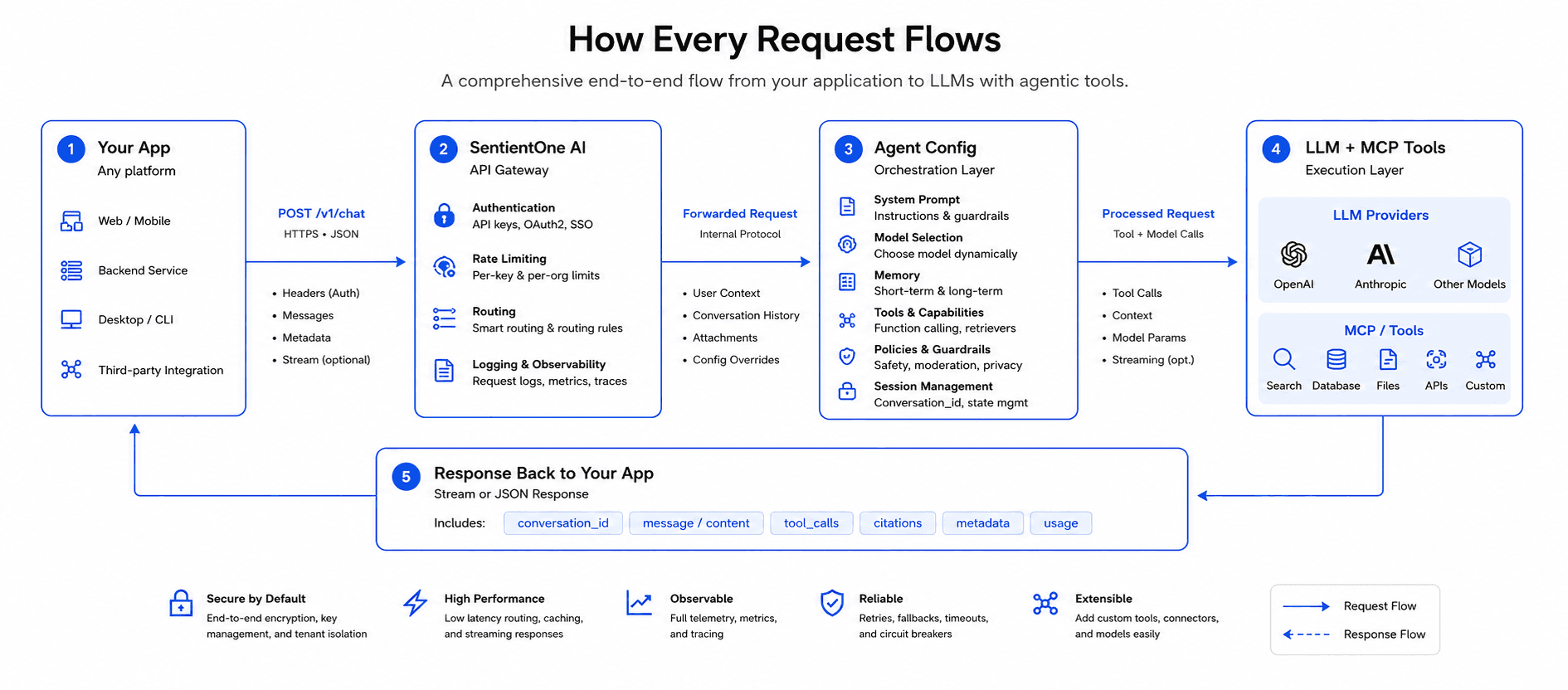
What SentientOne is
A simple, request-driven agent platform. You build an agent in the dashboard — give it a system prompt, a persona, the tools it can call, and the knowledge it should ground its answers in — then invoke it from any internal app with a single POST /v1/chat/stream. One endpoint, two headers, JSON in / Server-Sent Events out. That's the whole product surface.
- Prompt + personaConfigure the system prompt and tone once, version it, and roll back when you need to.
- Tool callingConnect MCP servers so the agent can look things up in your APIs (orders, products, tickets, anything you expose).
- KnowledgeUpload documents, drop in Q&A snippets, crawl a website — the agent retrieves the right context on every call.
- One API callSame call shape from every app — web, mobile, internal tools, cron jobs. Route to a different agent by changing the
X-Agent-Idheader.
What SentientOne isn't
We're deliberately not in some of the spaces other "agent platforms" live in. Knowing what we don't do helps you pick the right tool for your problem.
- Not an always-on agentAgents don't sit in the cloud running on their own. They wake up when your app calls them, do their work in a few seconds, and shut down. If you need long-running autonomous workers, that's a different shape of product.
- No idle billingWe don't charge for time agents sit idle or for requests you don't send. The plan covers a monthly request bucket; if you don't use it, you don't pay for it.
- You pay the LLM directlyToken cost goes straight to your provider (OpenAI, Anthropic, Gemini, Groq) on your own key. We never mark up tokens or proxy your provider bill — see LLM Keys.
- Not a workflow orchestratorOne request, one conversation, one reply. We're not a long-running pipeline engine — if you need DAGs of steps that run for hours, pair us with a workflow tool and call us per step.
- Not a model trainerYour prompts and conversations are never used to train any model. The platform passes data through to the LLM and back — see Security.
The platform at a glance
Configure system prompts, models, knowledge, and tools.
Usage, cost, latency, and errors across every agent.
Step-by-step execution timeline for any API call.
Embed any agent as a public widget on your website.
Brand the portal, invite teammates, scope agent access.
One POST endpoint, two headers, JSON in / JSON out.
Where to start
I'm new — get me running
10-minute quick start: sign up, save a provider key, ship an agent, send your first request.
Read moreI want to build agents
Wizards, templates, knowledge sources, MCP tools, advanced parameters.
Read moreI'm wiring an integration
One endpoint, two headers. Auth, request shape, streaming, errors.
Read moreBuild
Agents
Configure system prompts, models, knowledge, and tools. Every agent is one row of config and one POST endpoint.
Read morePlayground
Owner-only test surface. Iterate on prompts and publish when you're happy.
Read moreChat
Member-facing conversation surface in your branded portal.
Read moreChatBot
Theme and embed a public widget on any website with one script tag.
Read moreOrganization
Brand the portal, invite teammates, scope agent access per member.
Read moreObserve
Configure
REST API
API Overview
One endpoint, two headers, JSON in / JSON out.
Read moreAuthentication
Platform key + agent id. Where to find them, how to keep them safe.
Read moreChat Endpoint
Request body, response shape, multi-turn handling.
Read moreStreaming
Server-Sent Events for token-by-token delivery.
Read moreError Codes
Every error the platform can return, what it means, how to fix it.
Read moreCode Examples
Copy-paste integrations in Python, JS, TypeScript, C#, and cURL.
Read morePlatform
Observability
Zero-instrumentation logs, captured fields, why it matters at scale.
Read moreSecurity
Encryption, isolation, RBAC, SOC 2, GDPR, ISO 27001.
Read moreHosting & Deployment
Cloud, on-premise, hybrid — pick the model that fits your compliance.
Read moreUse Cases
Order Agent + Product Agent + the recommended integration pattern.
Read moreFrequently asked
What's the difference between an agent and a chatbot?
Do I need to bring my own LLM key?
Use saved key dropdown. You pay the provider directly for tokens; SentientOne charges only for the platform.Can the same key call multiple agents?
X-Api-Key) authenticates your account. Use the X-Agent-Id header to pick which agent runs each request. A single integration can route to as many agents as you need.Where do I see what a request actually did?
X-Trace-Id header you can paste into the filter to find the exact request.Is my data used to train models?
Can I run SentientOne on my own infrastructure?
How to read these docs